Most flatbed scanners claim high specs on the box. But what you see is often not what you get. The truth about scanner resolution lies in the hardware. Most flatbeds offer a true hardware resolution of at least 300×300 dots per inch (dpi). This number isn’t random. It comes from two distinct physical factors.
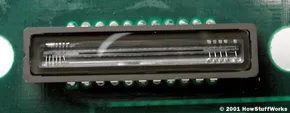
The first is the x-direction sampling rate. This depends on the number of sensors in the CCD imaging array. The second is the y-direction sampling rate. That relies on the precision of the stepper motor.
Think of it this way. If a scanner has a resolution of 300×300 dpi, the math is simple. A letter-sized document is 8.5 inches wide. Multiply 8.5 by 300. You get 2,550 sensors. That is how many sensors sit in each horizontal row. A single-pass scanner would have three of these rows. The total is 7,650 sensors. The stepper motor moves in increments of 1/300th of an inch. That is the physical limit of the hardware.
Optics Define Sharpness
Resolution is not the same as sharpness. Sharpness comes from the quality of the optics. Specifically, the lens and the light source matter. A bright xenon lamp paired with a high-quality lens creates a clearer image. It is sharper. Standard fluorescent lamps and basic lenses fall short. They produce blurrier results even if the pixel count is high.
You might notice scanners advertising resolutions of 4,800×4,800 or 9,600×9,600. Do not be fooled. A hardware resolution with an x-direction sampling rate of 9,600 would require a CCD array of 81,600 sensors. That is almost unheard of. Manufacturers label these high numbers as software-enhanced or interpolated resolution.
What does that actually mean?
Interpolation is a software trick. It increases the perceived resolution of an image. The software creates extra pixels between the ones actually scanned by the CCD array. These extra pixels are a weighted average of the adjacent pixels. If the hardware resolution is 300×300 and the interpolated resolution is 600×300, the software adds a pixel between every two pixels scanned by a CCD sensor. It is filling in the blanks. It does not add real detail. It guesses.
Is 600 dpi Good Enough?
Many users ask if 600 dpi is good for scanning. The short answer is yes. A 600 dpi scanner can produce images good enough for almost any purpose. If you want to scan an image and make enlargements, 600 dpi will be just fine. It balances quality with file size and processing speed.
For everyday users, understanding this distinction matters. You do not need 9,600 dpi interpolated software to scan a tax document. You need a decent lens and a steady motor. That gives you clean edges and readable text. The hardware limits are real. The software can only guess what it cannot see.
“Sharpness depends mainly on the quality of the optics used to make the lens and the brightness of the light source.”
This explains why a cheap scanner with high megapixel claims often produces muddy photos. The sensors are there. The lens is soft. The light is weak. The result is a large file with no real detail. A modest scanner with good optics often wins.
There are other technologies in play too. CCD vs CMOS sensors differ in how they capture light. Inkjet printers also factor into the final output quality. But for scanning, the base hardware sets the ceiling. Interpolation just paints over it.
How much detail do you actually need? That depends on the document. Text requires less. Photographs require more. But beyond 600 dpi, you are mostly paying for marketing numbers. The real quality comes from the light and the lens. Not the pixel count