The 2008 Sichuan earthquake in China serves as a grim reminder of how quickly natural disasters can compound. After the 7.9 magnitude quake killed over 55,000 people and caused billions in damage, the immediate threat wasn’t just the ground shaking. Landslides blocked rivers, creating a risk of catastrophic flooding. Local authorities had to act fast. They used emergency text messaging to warn residents downstream. The goal was simple: get people out before the waters rose.
A few months earlier, in January 2008, a different kind of storm hit the US. An unseasonal tornado struck Poplar Grove in Boone County, Illinois. It flattened four homes. The incident was so surprising that neighboring Winnebago County adopted a Reverse 911 system. Now, residents get alerts via landlines, cell phones, email, and VoIP numbers during severe weather.
Sirens are fading. Digital and web technology has taken over. We rely on these warnings to head to the shore or batten down the hatches. But the infrastructure behind these warnings is complex. Emergency alerts now reach your PC, cell phone, or tablet through various channels.
Which method is actually effective? And how do you ensure you are on the list?
The Emergency Alert System
Before we get into the nitty-gritty of how to sign up, we have to look at the backbone of US warnings: The Emergency Alert System (EAS).
For decades, the EAS relied on radio and television broadcasters. It was a top-down approach. The government sent a signal. The station had to interrupt programming. If they didn’t, they faced hefty fines. This system worked when everyone was sitting in front of a TV or listening to the radio. It didn’t work so well when you were driving, hiking, or asleep.
The shift to digital alerts changed the game. It moved the power from the broadcaster to the subscriber. You now control your device. You choose your carrier. You pick your apps.
Why does this matter? Because a siren is loud. But a siren is also local. It only covers a specific radius. A digital alert can reach millions of people instantly. It can target specific zip codes. It can even target specific devices in a specific area. This is known as geolocation.
The EAS is still there. It’s just not the only player in the room anymore. The Wireless Emergency Alerts (WEA) system, which sends messages to mobile phones, is part of this broader ecosystem. It uses your phone’s cell tower location to decide who gets the message.
This means you don’t have to sign up for everything. Some alerts are automatic. Others require action. Understanding the difference is key to staying safe without being bombarded by noise. The technology is faster. It’s more targeted. And it’s increasingly invisible until your phone buzzes.

The End of the Shriek
Remember that piercing, electronic wail? The one that used to interrupt sitcoms and news broadcasts during the Cold War era? That was the original Emergency Broadcast System, a Cold War relic designed to let the president speak directly to the public. After 1963, the scope widened to include state and local alerts. The Federal Communications Commission (FCC) mandated that every TV and radio station run the test once a week. Between 1976 and 1996, the system triggered over 20,000 times, mostly for weather.
It was loud. It was frequent. And it was analog.
How the Emergency Alert System Works
In 1997, the FCC pulled the plug on the shriek. They replaced it with the Emergency Alert System (EAS), a digital overhaul that changed everything.
The new test signal is just eight seconds of digital data. It runs through AM/FM stations, broadcast TV, cable systems with 10,000+ subscribers, digital radio, and satellite providers. Digital tech means faster transmission. It also allows for specific geographic targeting and denser information packing.
Here is the technical flow during a severe weather event:
- The National Weather Service (NWS) issues an alert via NOAA Weather Radio (NWR).
- This uses Specific Area Message Encoding (SAME), a protocol identical to the EAS.
- Local broadcast equipment decodes that NWR signal.
- The station or cable provider retransmits the warning.
You might see it as scrolling text at the bottom of your screen. Or hear it over the air. State and local officials can also trigger these alerts in cooperation with FEMA. The system is designed to work unattended. If a station is closed, the equipment still broadcasts. Messages can also be automatically converted into any language the station supports.
Beyond the Screen: NOAA Weather Radio
You don’t need a TV to catch these alerts. The National Weather Service operates an all-hazards radio network called NOAA Weather Radio (NWR).
These devices range from $20 to $200. You can find them in electronics and sporting goods stores. They plug into dedicated frequencies. Higher-end models offer specific features for different needs:
- Tone alarm: Wakes you up at night when the audio is muted.
- SAME technology: Filters out alerts not relevant to your zip code.
- Battery backup: Keeps running when the power grid fails.
- Sensory alerts: Vibrations, strobes, and lights for the hearing impaired.
Cell Phone Weather Alerts
Maybe you’d prefer to receive weather alerts via your cell phone or mobile device. Keep reading to find out what options are available.


The weather at your destination might be the only thing standing between you and a ruined trip. Whether you’re waiting for a flight or sitting in the stands, knowing about a storm before it hits matters. The easiest way to get that info is right in your pocket. You don’t need a premium package to stay safe.
App developers have flooded the market with options. You can get simple pushes or full-blown emergency notifications. Media giants like The Weather Channel also feed data directly to your screen, often pulling from National Weather Service reports via the Emergency Alert System. Even local governments are jumping in.
Prices range from zero to a few bucks a month. Your carrier matters too. Some services are free, but your provider might still charge for texts. Here is how you can actually get these alerts without bleeding money.
Emergency Email Network
This service sends free emails to your phone, PC, or any wireless device. It covers homeland security issues, natural disasters, and severe weather. You just provide your ZIP code and email address. You pick the topics. You pick the device. It’s basic. It works.
The Weather Channel 4CAST Alerts
They offer a subscription service called 4CAST. It sends text messages for severe weather, next-day rain, extreme heat, or icy conditions. They also handle pollen data on demand. It’s not free, but it’s comprehensive. The data comes from established meteorological sources.
My-Cast from Digital Cyclone
This app offers forecasts, maps, and automatic alerts. Your phone beeps when storms approach or lightning strikes nearby. It pulls watches and warnings directly from the National Weather Service. The cost is $3.99 a month. It works on BlackBerry, iPhones, and many other phones. It does not work on AT&T’s network. That’s a big limitation for some users.
Norfolk Alert and Local Services
If you live in Norfolk, Virginia, you can register for city-offered emergencies. You pick your alerts. Inclement weather. Road closings. Emergency notifications. You can get these via home phone, cell, or email. Other towns have similar setups. Check your local government’s website. It’s often free.
WeatherBug Protect
WireFly’s WeatherBug Protect costs $2.99 a month. It targets BlackBerry and other cell phones. It pins your cellular location and sends alerts for that specific spot. You get voice, text, or email notifications. It even has two-way messaging. You can report conditions back personally. That feedback loop is useful.
Space Weather and Beyond
Looking further out? Check NOAA’s Space Weather Prediction Center. You sign up for free emails. You get alerts about comets, asteroids, and geomagnetic storms. It’s niche. But for certain users, it’s essential.
The Future of Direct Texts
Wouldn’t it be great if the National Weather Service sent texts directly to users? It’s in the works. The FCC is pushing for Emergency Text Messaging. It’s not here yet. But it’s coming.

The Push for Direct Wireless Emergency Alerts
You trust the National Weather Service radio network. It is the gold standard for cutting through the noise when a tornado touches down. But you are rarely carrying a dedicated NOAA weather radio in your pocket. You might check your phone’s carrier alerts, but often those are just reruns of the Emergency Alert System (EAS) broadcast. It is a step removed. A direct line from the source to your screen would be better.
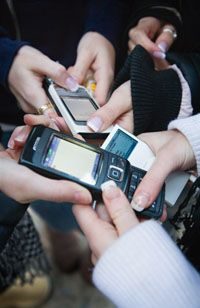
The Federal Communications Commission and FEMA are building that direct line. The goal is simple but massive. Move emergency alerts beyond the traditional radio and television screens. The plan is to push audio, video, and text messages to landlines, websites, email inboxes, and cell phones. This shifts the paradigm from passive listening to active receiving.
How the Mobile Alert System Works
The FCC approved the framework in April 2008. The mechanics are straightforward. A designated federal agency creates the alert content. They send it to participating mobile carriers. Those carriers then push the notification to their subscriber bases.
Participation is voluntary for the carriers. That might sound risky. But the major players have already signed up. T-Mobile, Verizon, Sprint, Nextel, and AT&T have committed to participating. You retain the right to opt out. Just like you can unsubscribe from spam, you can choose not to receive these critical updates.
Triggers for the System
The system is not for minor inconveniences. It is built for high-stakes scenarios. The alerts trigger on three specific types of events:
- Disasters endangering public health and safety, including terrorist attacks.
- Natural disasters like hurricanes, earthquakes, tornadoes, and severe storms.
- Child abductions, specifically triggering Amber Alerts.
This covers the spectrum from the immediate physical threat of a storm to the urgent, time-sensitive crisis of a missing child.
Accessibility and Timeline
Once the federal agency is in place, carriers have a strict deadline. Ten months. That is the window to meet the new system’s requirements. One of those requirements focuses on accessibility. The system must be usable by people with disabilities. Carriers will need to implement distinct vibration cadences or unique sound cues. A generic buzz won’t cut it. The alert needs to be unmistakable.
The legal backbone is the Warning, Alert and Response Network Act. Congress passed it in October 2006. The Commercial Mobile Alert System (CMAS) was mandated by this legislation. Despite the early approval and carrier buy-in, the nationwide rollout was not expected until sometime in 2010.
For deeper dives into the mechanics of these notifications, look into how Emergency Notifications Work and how SMS protocols function. The ecosystem relies on the integration of the Emergency Alert System with modern digital infrastructure. Keep an eye on the National Oceanic and Atmospheric Administration for the latest on weather radio capabilities. The shift from broadcast to push notification is inevitable. The technology is ready. The legal framework is set.