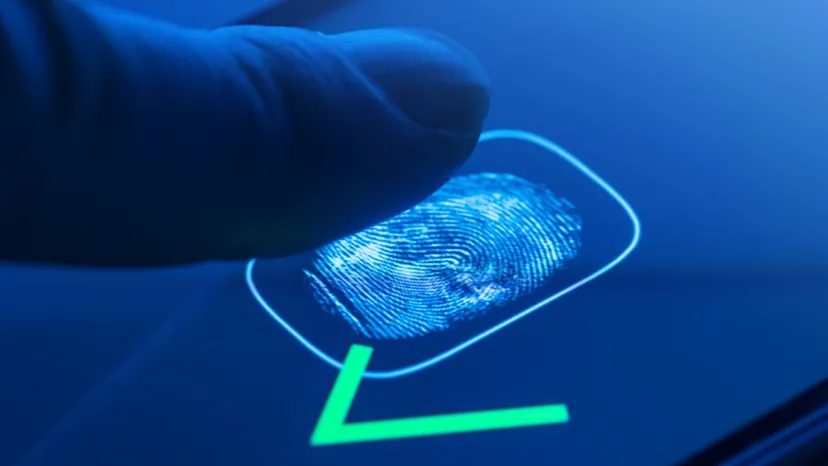
Fingerprint readers used to belong in the realm of Hollywood espionage. They were bulky, expensive curiosities reserved for secret agents and high-stakes heists. That era is over. Today, these devices are everywhere. You’ll find them in police precincts, corporate lobbies, and tucked into the corners of modern PC keyboards.
The barrier to entry has collapsed. You can buy a personal USB fingerprint scanner for under $100. Suddenly, your desktop or laptop is shielded by biometric tech that was once considered exotic. It replaces—or doubles—your password. You don’t type a string of characters anymore. You press a finger.
But how does this actually work? And more importantly, what happens when it doesn’t?
The Mechanics of Digital Identity
Most of these consumer-grade scanners rely on capacitive sensing. Think of it like a microscopic battery. The sensor contains thousands of tiny capacitor plates. When your fingerprint touches the glass, the ridges of your print touch the surface. The valleys (the spaces between ridges) do not.
This physical difference creates a variation in electrical charge across the sensor’s surface. The scanner maps this pattern. It doesn’t store an image of your finger. It stores a mathematical representation of the unique topography—the loops, whorls, and arches that make you, you.
“The system doesn’t save a photo of your finger. It saves a map of ridges and valleys.”
This is different from optical scanners, which use light to take a picture. Capacitive sensors are harder to fool with a simple photograph, but they are not invincible. They measure conductivity. Dry skin can cause failures. Wet hands can cause false reads. And if the sensor gets dirty? You’re locked out.
How Fingerprint Security Compares to Passwords
Why move away from passwords? Because they are terrible. Humans are bad at creating complex strings. We reuse them. We write them on sticky notes. We forget them.
Fingerprint scanners offer convenience. You can’t forget your finger. You always have it. For the average user, this feels like a upgrade. It’s faster. It’s tactile. It feels secure.
But it’s not.
Passwords are secret. Your fingerprint is public. You leave them on coffee cups, door handles, and smartphone screens. Once a password is stolen, you change it. Can you change your fingerprint? No.
This is the fundamental flaw in biometric authentication. A password is something you know. A fingerprint is something you are. If the database storing the “is” gets breached, the damage is permanent. There is no “reset” for your identity.
Where Failures Occur
Fingerprint scanners are not infallible. They fail for two reasons: false positives and false negatives.
A false positive is when the system says “yes” to the wrong person. This is rare in high-end enterprise systems but more common in cheaper consumer units. A false negative is when the system says “no” to the right person. This happens when your finger is slightly misaligned, dry, or dirty.
For law enforcement, false negatives can mean a suspect walks free. For you, it means you’re late to work because your scanner won’t recognize your thumb.
Then there is the spoof. Can you fake a fingerprint
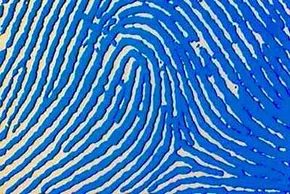
Fingerprints aren’t just a cool party trick of evolution. They are a functional tool. The ridges on your fingertips existed long before we needed to unlock our phones. Our ancestors needed grip. The pattern of skin acts like the tread on a tire, channeling sweat and increasing friction. It helps hands grasp objects in wet or dry conditions. That biological advantage was the primary driver.
The uniqueness of those ridges is a different story. It’s mostly luck.
DNA provides the blueprint for skin formation in a developing fetus. But it doesn’t dictate the exact micro-pattern. That detail emerges from chaotic environmental factors in the womb. The position of the baby. The density of the amniotic fluid. The pressure against the uterine wall. These random variables interact in a way that is statistically impossible to replicate. No two people have the same print. Not even identical twins.
This biological randomness is what makes fingerprint analysis useful for security and forensics. A trained eye or sophisticated software can spot minute differences between two prints that look identical to the naked eye.
Modern scanners automate this process. They capture the ridge pattern and compare it against a database. They do this using one of two primary technologies: optical or capacitance scanning. Both produce a digital image of the friction ridges. But their methods are fundamentally different.
The Mechanics of Optical Scanning
Optical scanners are the oldest and most recognizable type. They work similarly to a flatbed document scanner or a digital camera. The core component is a Charge Coupled Device (CCD). This is the same light-sensing array found in camcorders and DSLRs.
A CCD consists of thousands of tiny light-sensitive diodes called photosites. Each photosite converts photons into an electrical signal. These signals represent pixels. The collective data forms a digital image.
Here is how the capture process actually happens.
You place your finger on a glass plate. An array of Light Emitting Diodes (LEDs) beneath the glass illuminates your finger. The light reflects off the ridges of your skin. The valleys between the ridges absorb more light or let it scatter differently. The CCD captures this reflected light.
The result is an inverted image. Darker areas in the digital file correspond to the ridges, which reflect more light back to the sensor. Lighter areas represent the valleys.
But a raw image isn’t enough. The scanner needs to ensure the data is usable before it attempts to match the print against stored records. The processor runs a quick quality check.
It analyzes the average pixel darkness. If the image is too dark or too light, the scan is rejected. The system then adjusts the exposure time. It lets in more light or blocks it out. It tries again. This loop continues until the lighting is adequate.
Once the exposure is correct, the processor checks image definition. It scans horizontal and vertical lines across the image. A sharp, clear fingerprint will show distinct alternations between dark and light pixels along these lines. If the image is blurry or low-contrast, the scanner demands another attempt.
Only when the image is crisp and properly exposed does the system begin the matching process.
Why Capacitance Scanners Differ
Capacitive scanners don’t rely on light. They don’t use LEDs or CCDs. Instead, they use the principles of capacitance. Every human body is conductive. The scanner creates a microscopic grid of capacitors on the surface of the glass.
When you place your finger on the sensor, the ridges and valleys interact with this electric field differently. The ridges touch the glass, changing the capacitance at those specific points. The valleys hover slightly above the surface, creating a different electrical signature.
The scanner maps these changes in capacitance. It builds a digital representation of the finger based on electrical signals rather than reflected light. This method is more resistant to environmental factors like moisture or dirt on the glass. It also tends to be more durable since there are no complex optical lenses to break or misalign.
Both technologies aim for the same goal: a high-fidelity digital map of your unique ridge pattern. The choice between them often comes down to cost, size, and the specific environment where the scanner will be used. Optical units are cheaper to manufacture but can be bulkier. Capacitive units are smaller and more secure, which is why they dominate the smartphone market today.
Capacitive scanners don’t rely on light. They use electricity.
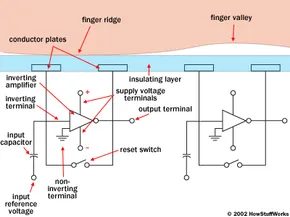
You get an image of the ridges and valleys, just like with optical sensors, but the mechanism is entirely different. Instead of a camera, you have an array of tiny cells. Each cell is a semiconductor chip containing two conductor plates separated by an insulating layer. These cells are microscopic. Smaller than the width of a single ridge on your finger.
The system connects to an integrator. This circuit uses an inverting operational amplifier. That’s a complex mix of transistors, resistors, and capacitors. We won’t dive into the full physics of op-amps here—that’s a rabbit hole. Just know that the amplifier alters a supply voltage based on fluctuations in input current.
Here’s the setup:
The non-inverting terminal is grounded. The inverting terminal connects to a reference voltage and a feedback loop. That feedback loop includes the two conductor plates.
Those plates form a capacitor. An electrical component that stores charge.
When you place your finger on the sensor, your skin acts as a third plate. It sits on top of the insulator. In the valleys, there’s a pocket of air.
Distance matters. Capacitance changes based on the gap between plates. A ridge is closer to the sensor than a valley. Therefore, the capacitor under a ridge stores more charge than one under a valley.
The processor handles the scan in a few steps:
1. It closes a reset switch for each cell. This shorts the input and output to balance the circuit.
2. It opens the switch.
3. It applies a fixed charge to the integrator circuit.
The capacitors charge up. The feedback loop’s capacitance affects the voltage at the amplifier’s input. This shifts the output voltage. Because the distance to your finger varies, the voltage output for a ridge differs from that of a valley.
The processor reads these voltages. It decides if a signal represents a ridge or a valley. It repeats this for every cell in the array. The result is a digital map of your fingerprint.
Why Capacitive Beats Optical
The main advantage is security. Capacitive scanners require a physical, three-dimensional fingerprint. They don’t just read the light and dark pattern of a visual impression. This makes it significantly harder to trick the system with a fake print or a photo.
There’s also a size benefit. Optical scanners need CCD units and lenses. They’re bulky. Capacitive scanners use semiconductor chips. They are far more compact. This is why you see them embedded in laptop trackpads and smartphone bezels.
Minutiae: The Real Matchmaker
Movies lie.
In film, fingerprint analysis looks like a game of overlapping transparencies. Investigators slide one image over another until the ridges align. It looks dramatic. It is not practical.
Real prints smudge. Two scans of the same finger can look nothing alike due to pressure or dirt. Trying to overlay entire images wastes processing power. It also creates a larger surface area for data theft.
Instead, systems compare minutiae.
These are specific points on the fingerprint. Investigators and algorithms focus on where ridge lines end. Or where one ridge splits into two. That split is called a bifurcation. Collectively, these features are sometimes referred to as typica.
The software uses complex algorithms to map these points. The logic is similar to recognizing a constellation by the relative positions of stars. You draw lines between the minutiae. You measure the shapes they form.
If two prints have three ridge endings and two bifurcations that form the same shape with the same dimensions, the likelihood of a match is high.
The system doesn’t need to find every single point in both prints. It just needs to find enough common minutiae patterns to pass a threshold. That threshold varies depending on the scanner’s programming.
It’s a balance of efficiency and accuracy. Find enough points. Trust the math. And hope your finger stays clean.
Authentication boils down to three things: what you have, what you know, and who you are.
Most systems lean on the first two. An ID card with a magnetic strip covers “what you have.” A password or PIN handles “what you know.” But biometric systems? They dig into “who you are.” They look for the physical proof of your existence—the ridge patterns in your fingerprints, the shape of your iris, the unique cadence of your voice.
Why Physical Traits Win (Usually)
Fingerprint scanners have a distinct edge over traditional keys and codes. You can’t lose your fingerprints. You won’t forget them if you’re stressed. And unlike a password, which can be guessed or brute-forced, your ridge pattern is nearly impossible to guess.
Physical attributes are significantly harder to fake than an access card.
That’s the sales pitch anyway. In theory, biology is the ultimate lock.
The Illusion of Invincibility
Here’s where the theory cracks. Biometric systems are not infallible. They are flawed.
Optical scanners often struggle to tell the difference between a live finger and a high-resolution photograph. Capacitive scanners, which measure the electrical properties of your skin, can be tricked by a mold. If someone steals your prints, they can replicate them.
Worse still, determination beats convenience. A criminal doesn’t need to guess your code. They can steal a mold of your finger. Some advanced scanners use heat or pulse sensors to verify the finger is alive. But even those can be fooled by a gelatin mold placed over a real finger. The technology is good. It is not perfect.
The Fatal Flaw: You Can’t Change Your Face
The real danger isn’t that a scanner will fail to recognize you. It’s that it might recognize the wrong person. Or that your data gets stolen.
Think about it. If you lose your credit card, you call the bank. You get a new number. If someone steals your PIN, you change it. These are temporary inconveniences.
Biometrics are permanent.
If someone steals your fingerprint data, you are stuck with it. Forever. You can’t grow new fingers. You can’t update your iris pattern. Once that biometric template is out there in the wild, compromised and copied, you are vulnerable for life. You would have to be absolutely certain every copy was destroyed before trusting the system again. There is no reset button for your body.
The Hybrid Solution
Because of this existential risk, relying on biometrics alone is reckless. The most secure systems combine methods. They use multi-factor authentication.
Think of an ATM. You need the card (what you have) and the PIN (what you know). Biometric systems work best when layered with a conventional password or token. It adds a barrier that can actually be changed if compromised.
The Future is Bio
Despite the risks, the adoption of fingerprint scanners and other biometric systems is accelerating. They are becoming an integral part of everyday life, replacing the keys on our keychains and the passwords in our wallets.
We are moving toward a world where our bodies are our credentials. It’s convenient. It’s fast. It’s also, fundamentally, a high-stakes gamble with our own physical identity.
For deeper dives into how these systems operate, look into dermatoglyphics (the study of fingerprints), facial recognition systems, and encryption protocols. The links below explore the mechanics behind the magic.
Frequently Answered Questions
How do fingerprints get scanned?
A machine captures an image of the ridge and valley patterns on your finger. This image is converted into a digital template. That template is stored in a database. Later, it is compared against new scans for identification.
Can fingerprints be faked?
Yes. Optical and capacitive scanners can be deceived by molds, high-res photos, or gelatin replicas. Some systems use liveness detection (heat/pulse) to mitigate this, but determined attackers can bypass many of these checks.
Why is biometric theft worse than password theft?
Passwords can be reset. Fingerprints cannot. Once your biometric data is stolen, it is compromised for the rest of your life, with no option to generate a new biological ID.
Related HowStuffWorks Articles
- How DNA Evidence Works
- How Facial Recognition Systems Work
- How Encryption Works
- How Identity Theft Works
- How Lock Picking Works
- How Digital Cameras Work
- How Scanners Work
- How Capacitors Work
- How does a security password work?
- What is a “smart card”?
More Great Links
- Fingerprint Analysis – The Basics
- Dermatoglyphics
- Impact of Artificial “Gummy” Fingers on Fingerprint Systems
- The History of Fingerprints
- Taking Fingerprints