You’re rushing. Either you are a student packing bags for dorm life or a parent panic-shopping for the fall term. It doesn’t matter. The digital age demands hardware. Waiting until August is a mistake. Especially now.
Good deals exist today.
I’m long past my own graduation, but I remember the chaos of setting up a dorm room. You need three things: a laptop that won’t quit, some useful peripherals, and a decent screen. I’ve put together a shortlist. Affordable machines with real processing power.
Many of these newer models can actually run onboard large language models. That means they have enough RAM for local AI tools. I’m not suggesting you cheat on your essays. But having silicon that doesn’t choke? That’s a win. Budget laptops aren’t weak anymore. They handle work that used to cost a fortune.
So, what do you put in the backpack? Let’s look.
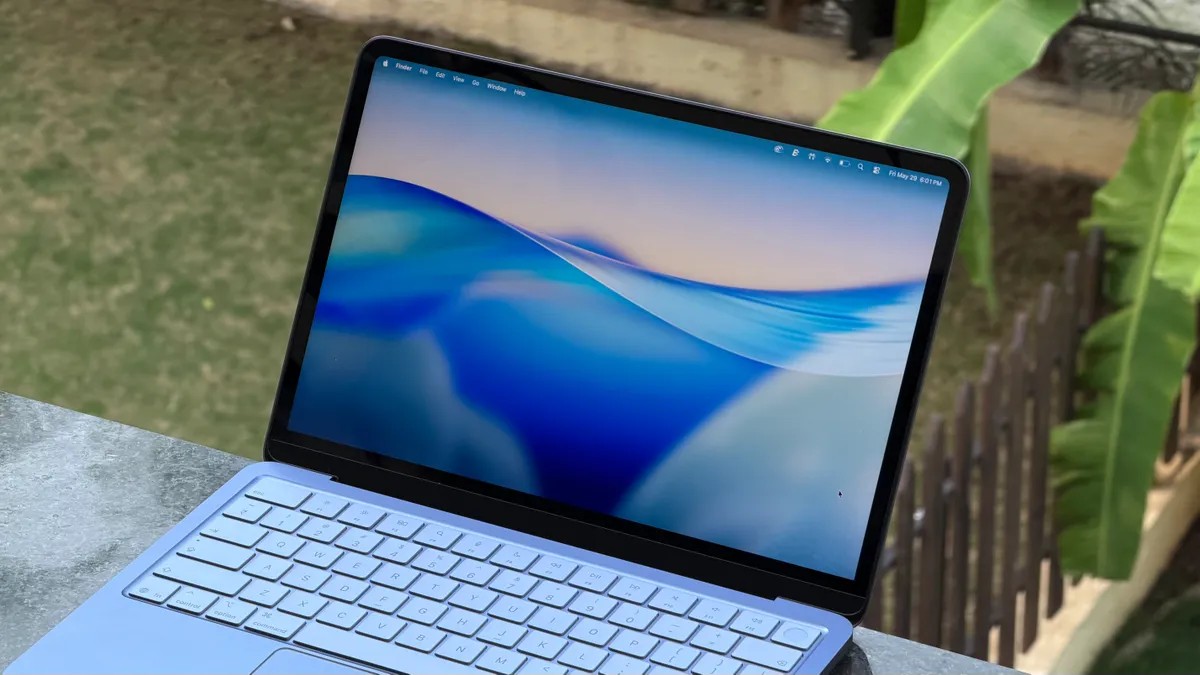
MacBook Neo
Apple remains the safe bet. Students love them for a reason. The ecosystem sticks. The OS is intuitive. And Apple has a history of student discounts.
Released this spring, the MacBook Neo is the entry point. It’s cheap for good reason. Apple took the iPhone 16 chip, shoved it into a laptop, paired it with 8GB of RAM and 256GB of storage, and lowered the price.
RAM costs more than gold these days. Finding a solid sub-$1,000 laptop is getting harder every month. The Neo cuts through that noise.
Retailers have it for $600. Hit them with the student code? $500. That’s a number you can’t beat in 2026
M5 MacBook Air
Want more juice? Want to spend real money? Go up the chain.
The M-series machines are flashier. The M5 MacBook Air hits harder than the Neo. It costs more too. If you don’t mind dropping four figures, the 13inch Air is a powerhouse.
Apple supports these devices forever. You get consistent updates.
The standard price is $1,100. The student discount shaves off $100. You’re looking at nearly a thousand bucks. Double the Neo’s cost. But you’re not just buying a pretty face.
The M5 chip comes with 16GB of RAM. A 512GB drive. This is hardware you won’t outgrow during four years of schooling.
Buy once, cry never. That’s the philosophy here.
Dell XPS 13
I’ll say this for Mac lovers, the ecosystem is sticky. I stick with Windows myself. There’s a reason.
The Dell XPS 13 is the Neo’s direct rival. It fights for the same budget-conscious student.
Apple wins on discount pricing, usually. The XPS sits at $600 even after the student code kicks in. So far, so equal.
But look closer. The Windows machine has tricks Apple won’t share.
Portability matters. The XPS weighs 2.2 pounds. The Neo is 2.7 pounds. In a crowded classroom, half a pound feels like an anchor. Then there’s the screen. 2.5K resolution. 120Hz refresh. Touch capabilities. The Neo’s LCD lacks the touch interface entirely.
And that $100 price gap? You pay it for storage. The base XPS starts at 512GB. The Neo trails behind at 256GB.
For $100 more, you get more space, more screen speed, and less weight. Hard pass on the Mac for pure utility? Maybe.
HP OmniBook X Flip 14
Digital artists, stop reading the previous sections. Those machines might bore you. Or worse, they’ll fail you.
Standard laptops lack color accuracy. Most lack touchscreens. If you need to draw, annotate, or tactilely engage with your work, you’re stuck.
Enter the HP **OmniBook X Flip 1 4. It’s pricier, yes. But it’s a two-in-one. The hinge flips back. It becomes a tablet. Perfect for stylus work.
The specs hold up: AMD Ryzen AI 50340 processor. 16GB memory. 512 SSD.
The base price sits at $1,30. You get a 2K LCD panel. For another $90, you upgrade to a 30 OLED display. Skip that upgrade at your peril. OLED renders color the way humans see it.
$1,420 is steep. No one denies it. But buying a laptop and a drawing tablet separately costs more. You consolidate gear. One purchase solves two problems.
Satechi Slim X Keyboard
Spend $600 on a small laptop keyboard.
It hurts. Small keyboards suck. Your fingers cramp. You hit wrong keys.
The Satechi Slim X makes sense here. It’s wireless. It mimics the Apple layout, with a full row of Function shortcuts. It works on Mac. It works on Windows. It connects via Bluetooth to multiple devices at once.
Here is the killer feature. Backlights.
Apple’s Magic Keyboard doesn’t light up. Why would you? Because dorm rooms are dark at midnight. When the panic sets in and the paper is due at 8 AM, you can’t see the keys in the dark. The Satechi lights the way.
Plus, Satechi runs sales more often than Apple ever will.
Logitech Mobi Fold Mouse
Touchpads are annoying. Sometimes they track too little. Sometimes too much.
The Logitech Mobi Fold mouse solves the travel problem. It’s not the most comfortable ergonomic design ever. CNET reviewer David Carney admits that much. But he’d rather use this than a trackpad in class.
Why?
It weighs 2.8 ounces. It folds flat. It fits in your pocket, taking up less than an inch. You lug a heavy backpack full of books. The mouse tucks away silently.
Price tag: $80. Not cheap. But cheap enough when you consider the convenience factor. You stop fighting with slippery trackpad gestures.
Innocn 401R Monitor
Bring a small 13inch laptop to school? Your eyes will hate you after three weeks.
Dorm rooms need space. But they also need visibility. The Innocn 0C1R dominates the desk. It’s huge.
The specs aren’t cutting-edge. The 3440 by 1440 resolution panel feels a bit low for its size. Fast-paced gamers will see blur and artifacts. It’s not for the Twitch streamers.
It is for the writers. The researchers. The students who want to split-screen comfortably without squinting.
At 40 inches, it commands attention. Connect your laptop via USB-C. Boom. External display setup complete. It even comes with mounting hardware.
If you have the wall space, this changes the workflow. It’s bulky. It’s static. It’s necessary.
So. What are you buying?