


Topaz Video AI has become the go-to reference for video enhancement. It uses machine learning to restore old footage, fix low-res clips, and clean up noisy images. This software does more than just stretch pixels. It uses deep learning algorithms to analyze every single frame with deep learning algorithms. Detect blur, noise and digital artifacts and reconstruct details with startling precision. It allows users to convert SD videos to Full HD, 4K and even 8K quality. Processing is done frame by frame, which results in smoother movement. It is meticulous.
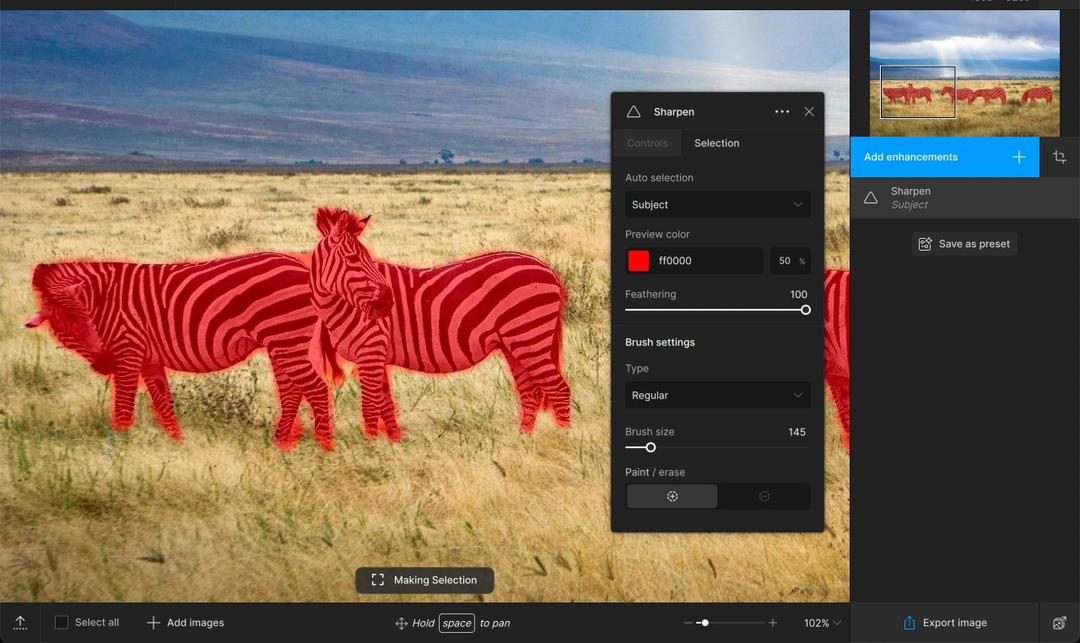
The user interface is very clean. It attracts both professional filmmakers and amateurs who want to polish their home movies. Topaz Video AI offers special AI models for different tasks. Choose from noise reduction, resolution upscaling, advanced stabilization, sharpening and restoration of severely degraded clips. Each model has customizable parameters. This allows the output to be customized according to the source material. This versatility makes it a key tool for post-production, cinema workflows, archive digitization and digital content creation.
“Topaz Video AI converts SD to 4K and 8K while maintaining smooth motion through careful frame-by-frame processing.”
One of the biggest advantages is the auto-priming. The software detects the visual features of the video and determines the initial settings. Beginners don’t need to learn the manual to press “enhance”. Professionals can view and override these settings manually. Bridges the gap between ease of use and granular control. It also manages GPU processing efficiently. Take advantage of the latest graphics engine for faster rendering. In production environments where time is money, that acceleration matters.
Compatibility and Installation Details
Topaz Video AI works on Windows 10 and 11. It also supports the latest versions of macOS. This covers most desktop and laptop users. Installation is very easy. You can download official installers from authorized partners like Futura. The wizard guides you through the steps. Internet connection is required to activate the license. Updates are also checked at this stage.
The developers offer separate installers for each platform. They are optimized for specific hardware architectures. There are no native versions for Linux, Android or iOS. Limited to desktop operating systems. Experienced users can try virtualization or unofficial ports. Do not expect technical support for these settings. Topaz Labs keeps it strictly to Windows and Mac.
The company also offers downloads of previous versions. This is useful if you have specific workflow requirements based on older hardware or specific workflow requirements that depend on legacy features. Updates are made via the native module. Get the latest technology and patches in real time. This ensures consistent performance over time.

Understand licensing models and upgrade paths
Topaz Labs has chosen a path that favors content creators who refuse subscriptions. The company still relies on the perpetual license model. You pay once. The software can be kept forever. This is unlike competitors who charge monthly or annual fees that can eat into your budget over time.
But there’s a problem. One-time purchases only cover major upgrades within a certain period of time (usually a year from the date of purchase). After that year? The core software remains yours. But what about the new version? If you want, you have to pay again.
Enter your upgrade pass. This is a renewal fee. This gives you constant access to the latest major releases and, more importantly, the latest AI models developed by Topaz. Without this, you’ll be stuck with the version you bought while others watch in sharper 4K.
The choice between a perpetual license and a subscription depends on how often you upgrade. If you buy it every year, it’s a subscription anyway.
Topaz Video AI does not have a free open source version. You can’t just download a cracked version and expect official support. An official key is required for all copies after the trial period. This is not just a question of legality. It’s about stability. Cracked AI tools rely on server-side validation or patching certain DLLs, so updates often break them. Buying a key gives you access to the support team if you have any problems.
Can I try before I buy?
Yes. Topaz offers a free trial. This isn’t a stripped down version with half the features missing. This is a complete software.
The catch? The output.
When you render a video in the trial version, the watermark will appear. It’s usually a large semi-transparent logo in the corner. It ruins the video for any serious use. The trial version also has a limited time. You can’t leave it running for weeks.
Why is this important? Because the computational cost of AI upscaling is very high. You need to know if your computer hardware can handle the 4K upgrade without crashing. This experiment allows you to test the GPU and CPU under load. This way yes see if the artifact removal actually looks good or if it just makes the face look like a wax figures.
Special discounts for students and professionals
Topaz Labs may offer discounts to students and researchers. This is not a permanent promotion like on the front page. This is usually a confirmed discount based on your ID.
If you are a student or researcher, check out our education portal. These discounts help popularize top-notch tools. AI upgrades were once limited to Hollywood studios with large rendering facilities. Discounts now allow documentary students and independent filmmakers to purchase restoration tools that once cost thousands of dollars.
Where Topaz Video AI really shines
Topaz Video AI is more than just a gimmick. Solve certain pesky issues in your video workflow.
Archival Restoration
This is bread and butter. The quality of old videos has deteriorated. The color changes. Noise creeps in. Topaz uses artificial intelligence to reconstruct missing details. It’s not magic, but it’s close. This is invaluable for historical archives and personal home movies. Turn grainy 480p clips into content that can be viewed on modern screens.
Social Media and Streaming
The authors often shoot with mobile phones or old cameras. Video may be shaky, low resolution, or poorly lit. If you upload it to YouTube or Instagram, it will be compressed even more. Topaz can upscale and clean your material before uploading. The result is a clearer final product on the platform.
Films and documentaries
Professional editors use Topaz to fix bad rushes. Maybe the lighting was off. Maybe the lens isn’t sharp enough. Instead of reshooting, yes run the material through artificial intelligence. Large productions use it to restore classic films for which the original high-definition masters do not exist, or to enhance documentary footage.
Study tips
The functionality of the software is very efficient. This is also complicated. These settings can be complicated for beginners.
Topaz Labs offers a Documentation Library. Includes guides, FAQs, and video tutorials. This content will be updated regularly as new features become available. However, the official documentation can be boring.
For those who want to learn more, third-party training platforms offer courses. These are usually paid. Learn about advanced settings, choosing an AI model, and optimizing your workflow. For professionals, this training is valuable. For amateurs, this may be a bit too much.
Options in the AI video field
Topaz isn’t the only game in town. There are other tools, each with different advantages.
DVDFab Video Enhancer AI
direct competitor. A different algorithm is used. Some users like its noise reduction method. This is also a paid option and usually comes with a similar perpetual license.
AVCLabs Video Enhancer AI
Another strong candidate. The main focus is on ease of use and speed. If you find Topaz too slow or complex for your needs, AVCLabs can provide a smoother experience.
Gigapixel AI
This tool is mainly used for images. However, it does have video capabilities. If your primary need is to enlarge photos for print or the web, Gigapixel is a cheaper option. It doesn’t completely replace a video editor.
All of these tools use different AI models. Results may vary significantly depending on the source material. One tool can handle movement better. Another method can preserve skin tone more accurately.
Why it matters to everyday users
You probably don’t editing a documentary. However, you may have old home videos. family gathering. vacation clips. These are usually of poor quality. It looks terrible on new 4K TVs.
Topaz Video AI lets you preserve your memories. It makes them watchable again. It’s not just about updating pixels. Rebuild the details. Reduces noise. Stabilizes shaky footage.
This technology is no longer just for the lab. Good for people with a decent GPU and a folder of blurry videos. Barriers to entry have been lowered. Costs are manageable. The results are real.
The video AI landscape is changing rapidly. New models are released every few months. The software is getting better. The hardware is faster.
But the core question remains. Is it necessary?
Not if you just watch Netflix. If you want to save your wedding video shot in 2008 with a Flip camera, yes.
The future of video is not only in 8K shooting. It’s all about saving what you’ve already shot. Topaz Video AI is a key tool in this rescue mission. Whether you buy a permanent license or rent an upgrade path depends on your commitment. But being able to see the past more clearly is a powerful thing.
And it just keeps getting better and better.
Topaz Video AI is more than just a filter on your timeline. It is a standalone post-production engine. Drag the material and the AI crushes it. You get sharper, clearer or higher resolution files.
Designed to fit into your existing workflow. With standard export profiles, you don’t have to fight with software to save a project. Built-in hardware acceleration. This is important because rendering 4K or 8K video without GPU assistance is a recipe for waiting through lunch twice.
System and hardware requirements
The software works on Windows 10/11 and macOS. But don’t just stick it straight into your 2015 laptop and expect miracles.
Requires a discrete GPU.
On Windows, this means that NVIDIA supports CUDA.
On macOS, Apple Silicon or Intel Macs using Metal.
The processor must be a modern 64-bit multi-core processor. Memory? At least 8GB. It’s the floor. If you want 4K or 8K resolution, you need more. Significantly more. If there is not enough memory, the software will freeze.
The storage space varies greatly depending on the project. AI upscaling doesn’t compress as aggressively during processing. You’ll need free space. Lots of it.
Input format and export flexibility
What’s inside is loose. Topaz Video AI accepts common containers such as MP4, MOV, MKV and AVI. Codecs vary by platform, but typically if the camera spits out a codec, the software can bring it in.
Where it gets useful is what comes out.
You are no longer limited to basic MP4 files.
Export options include:
– MP4 (H.264 and H.265)
-Apple ProRes
– Image sequences
This flexibility is very important for archivists and colorists. ProRes keeps the quality intact for grading. H.265 makes it easier to manage file sizes for web distribution.
Offline processing and licensing
Here is the catch with the internet connection. Required to activate the software. You need it to download the AI models. These models are huge. These are specialized for specific tasks such as super resolution or noise reduction.
Once activated?
Work completely offline.
This license is perpetual. Buy it once. You keep it. Updates are handled through an integrated update module, and commercial licenses have an upgrade option. A free trial version is also available. You can test the most important features with your own videos. Trial export without watermark, but may have limited resolution or time constraints.
The artificial intelligence toolkit
What exactly are you paying for?
This is more than just an algorithm. This is a special model series.
Super resolution.
It’s not just about sharpening. It’s reconstructing detail that isn’t there. It adds pixels where the original data was missing.
noise reduction.
Grainy low-light footage has been cleaned up. AI can distinguish between noise and real texture. It doesn’t just blur everything into a muddy mess.
Deinterlacing.
If you are using old broadcast material or scanned film, this will separate the fields and create a clean progressive image.
Stabilize.
Shaky cam? It fixes it. Uses artificial intelligence to track motion and correct frames without over-cropping.
Frame interpolation.
This creates a new frame between the existing frames. It smooths motion. Perfect for slow motion effects or displaying 24 fps footage at 60 fps.
User interface and ease of use
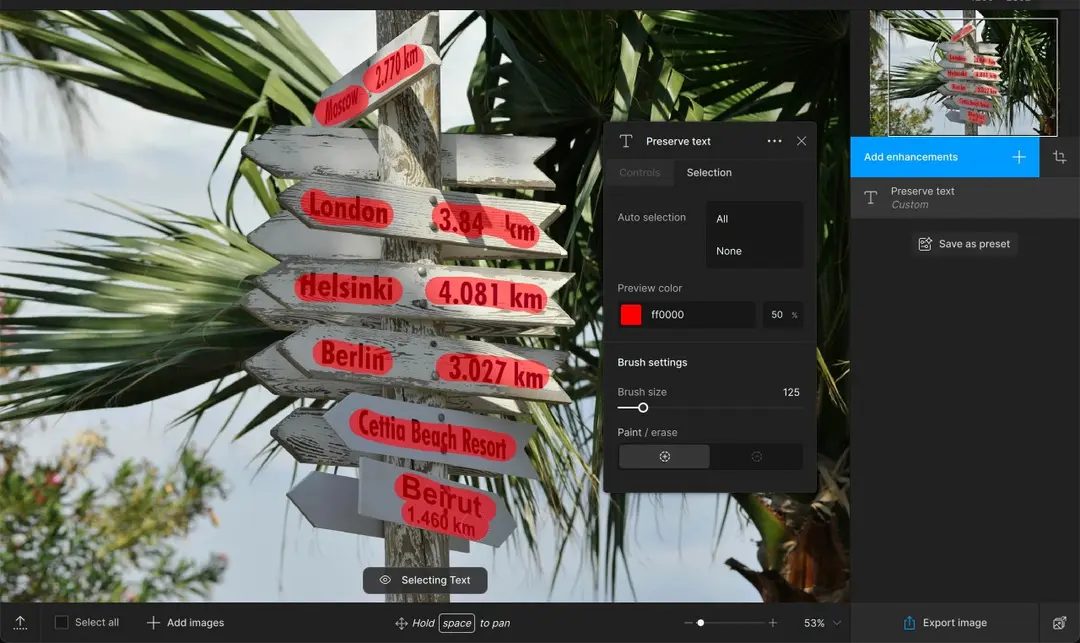
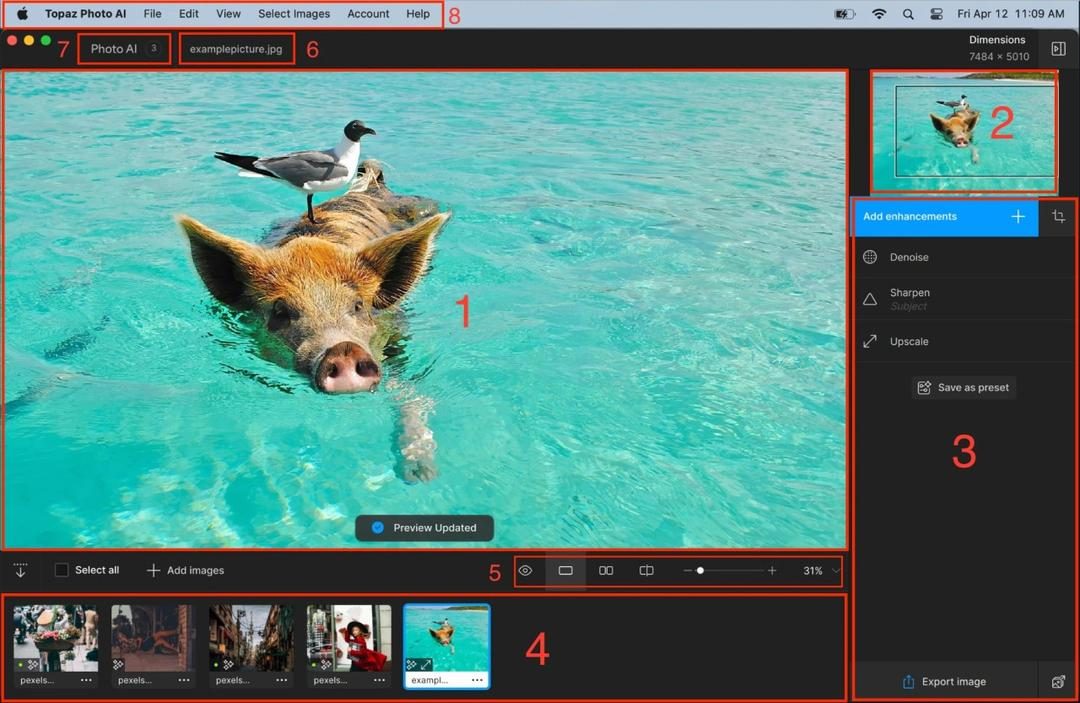
The user interface is very clean. Not cluttered.
Choose a model.
Adjust the parameters.
I’ll try to preview it.
you do.
The user interface is only in English. All documentation and instructions are available online and this is standard. This document has enough detail to understand why certain settings are appropriate for certain types of material.
Why this matters to everyday users
You might think this is just for Hollywood editors. it is not.
Maybe you have old home videos from the 90s. They are granular. They’re interlaced. The resolution is very low. Topaz Video AI can breathe new life into them.
Or you might be shooting in low light. There is noise in the video. This tool cleans it without spoiling the atmosphere.


The real costs of moving to the cloud
Most people think of moving to the cloud as renting a server. This is not true. It’s about changing the payment method for computing power. If you stop buying the hardware, you’re stuck with the hardware. Instead, you pay for what you use. This move allows small teams to scale without significant upfront costs. A big company? They use it for flexibility. But there’s a problem. Costs can skyrocket if you’re not careful.
Why Big Tech Moves
Amazon, Google and Microsoft started with large data centers. They built them to handle their own high volume of traffic. And then you find out that other people have the same problem. So they started selling excess capacity. It’s a win-win. The giants spread their fixed costs. The rest of us have access to enterprise-grade infrastructure. You don’t need to build your own data center. Just click the button.
What you really get
When you register, you get more than just space. You get a bunch of tools. compute instance. bucket. database engine. Network component. All managed by the service provider. There is no need to maintain the physical hardware. The cloud service provider is responsible for maintenance, electricity and cooling. This means less downtime. It also means less work for your IT team. You can focus on your code. Not cables.
Hidden traps for beginners
It’s easy to spend too much money. Start a huge server. Then you forget to turn it off. Next month’s bill is high. This is the problem with “zombie resources”. Even unused resources have their price. Data egress fees are also a silent killer. The cost of moving data from the cloud is typically higher than moving data to the cloud. If you’re building a media site, pay attention to these bandwidth costs. They multiply quickly.
Safety and compliance
Storing data offsite sounds risky. it is not. Major service providers invest billions of dollars in security. They have a team of experts. You… yes, you. If the firewall rules are configured incorrectly, you are vulnerable to attacks. S3 bucket configuration errors are a common news headline. The service provider protects the cloud. You secure in the cloud. This distinction is important. If you leave the door open, none of the service provider’s security measures will prevent a breach.
Which service provider is right for you?
There is no single best option. AWS dominates the market. It has the most features. It also has the steepest learning curve. If you are already deeply involved in the Microsoft ecosystem, Azure is for you. Google Cloud is very powerful in data analysis and machine learning. For startups, the free tiers of all three are worth testing. Don’t commit to one vendor too early. Lock-in is real. Moving later can be difficult and expensive.
Conclusion
Cloud computing isn’t a magic bullet. This is a tool. Scaling is simplified. Billing is complicated. If you treat it like a simple utility, you’ll get burned. Think of this as a complex platform. Monitor usage. Audit your security. Choose the service that meets your specific needs. The flexibility is unmatched. Just keep an eye on your bill.


